SDN Gives Small and Medium Businesses a Big Advantage

Guest blog provided by CENGN

ElastaLink is an Ottawa-based communication, networking and infrastructure service provider. Since their founding in 2015, they have developed a team of nearly 40 employees and now provide services to over 300 customers. Their client base includes all types of organizations with a special focus on retail businesses, manufacturing companies, healthcare providers, non-profits and hospitals. Recently, ElastaLink started developing software defined networking (SDN) services through a multi-tenant offering, with the aim of making this technology more accessible for smaller businesses. ElastaLink has begun a CENGN project to scale-test their multi-tenant SDN solution.

Why is SDN Important?

In a traditional network, a control plane resides within each router and switch. Having controllers spread through your physical infrastructure is cumbersome for network operators as they cannot easily provision resources and control how data flows through the network.
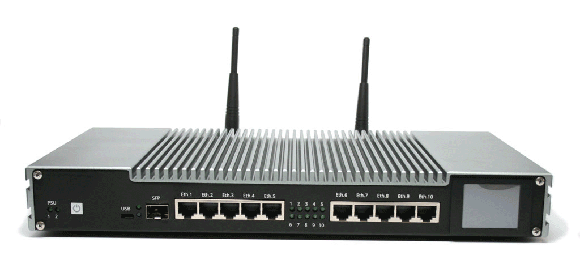
Macrotick Edge RouterAn SDN solution uses one platform as the control plane to manage many routers in a network. This gives network operators more power over their network, as all the control is within one centralized space. The control plane tells the other routers how to manage their loads, making the network more efficient and easier to administrate. As SDN keeps all the intelligence of the routers in one place, it allows the network to move faster, and it removes single points of failure on the network. As an added bonus, it gives the clients an easy-to-understand high-level view of their network and reduces the required network administration.

Adoption and investments in SDN are charted for mass growth over the next few years. IDC estimates that the worldwide data centre SDN market will be worth more than $12 billion in 2022. In fact, this growth has already been increasing rapidly with a market generated revenue of nearly $5.15 billion in 2017, up more than 32.2% from 2016. (Networking World Magazine, April 2019).

However, SDN controllers are expensive and require dedicated hardware and knowledgeable resources to operate. These are costs that are prohibitive to most small and medium enterprises (SMEs), making SDN technology somewhat inaccessible to these businesses. This is where ElastaLink comes in.

Working with Growing Canadian Businesses

ElastaLink offers multiple services to SMEs including Internet, email, phones, managed routing, Web development and hosting, backups and security planning, plus wireless networks. The company now plans to bring the advantages of SDN to its SME customers. ElastaLink has developed an integrated, multi-tenant SDN solution utilizing its existing ElastaLink Edge router at the CPE edge and a new multi-tenant SDN controller operating from the Cloud. Services, including load balancing, security, voice, video and email, will be offered from the ElastaLink data centres, customized and scaled for the SME market and delivered via the ElastaLink Edge Router. Most customer networking equipment already supports the OpenFlow protocol and SDN.

It is the company’s aim to provide the under-served SME market with the advantages of an SDN solution, at an acceptable price point. With a multi-tenant SDN offering, SMEs can rent a piece of ElastaLink’s SDN solution to enable enhanced network management services, security, flexibility and cost-effective service evolution, for a fraction of the cost of running their own SDN controller.

Path Towards Commercialization

With the SDN product developed, ElastaLink now needs to ensure all the features of the SDN network can be fully functional at scale, as well as understand the size and number of clients that can be supported on one SDN controller. To do this, the company is carrying out a CENGN project that will provide the infrastructure and support they require to move their offering closer to market.
Macrotick Edge Router
Utilizing CENGN’s commercial-grade infrastructure has major benefits for an already active company like ElastaLink. As ElastaLink’s infrastructure is currently being used to support its existing customers, CENGN is providing ElastaLink with a risk-free isolated testing environment. Not only does this remove the setup time of building its own test environments, it will also allow ElastaLink to keep their current infrastructure and resources committed to their customers.

Building the Test Environment

ElastaLink’s project space will be provisioned with one bare metal server, which will support 4 virtual machines (VMs) running the ElastaLink SDN solution, as well as a Cloud tenancy supporting 120 VMs to simulate routers, with an additional 30 physical routers distributed across multiple sites outside the testing environment. Throughout the project, ElastaLink will be leveraging CENGN’s technical expertise to validate the system performance of the new SDN solution while managing an incremental increase of both physical and simulated routers. CENGN’s infrastructure will put ElastaLink in a position to perform detailed performance testing and upon successful completion of the project, they will have the validation needed to establish credibility and readiness for launch.

Here at CENGN, we are happy to deliver our services to a promising Canadian business that also looks to support the growth and success of small and medium-sized businesses.

Stay tuned to see the results of this project!

ElastaLink is a growing Canadian business that is using the services at CENGN through the Next Generation Network Program (NGNP). The NGNP is a Government of Ontario program offered through a partnership between CENGN and the Ontario Centres of Excellence (OCE) that is providing small and medium-sized enterprises (SMEs) across Ontario access to the CENGN Testbed. CENGN’s digital infrastructure is connecting SMEs like ElastaLink to state-of-the-art equipment and network services, which will allow these companies to test and validate their solutions.


Checklist for When You're Moving Technology to a New Office

No longer can you move a firm without planning how to properly move your technology. Your goal is a seamless change of location to ensure staff can work with the least disruption and you don’t lose business opportunities or upset clients. There is little patience when a company says they cannot respond to a client because they are in the midst of a move. And since technology is a cornerstone for most business functions you need to apply thoughtful planning to ensure those functions are up and running.

Long before you start moving boxes you need to strike a planning committee that should include both management and employees. This will help ensure your move satisfies as many demands as possible and reduces the risk that you miss some key element. This article provides a guide to what you should be thinking about from the very early stages of a move right up to moving day.

Starting the Process

Choosing a location is often the first step in a move. You need to confirm that Internet service is available at the new location and that it can deliver enough speed and capacity for your needs.

If Internet lines need to be upgraded or installed then there will be added construction costs and you need to factor in time for the work to be completed before moving day. Your move is not a priority for installers, so plan the installation early enough to allow for possible delays from testers and plenty of time to check the new installation. Be aware that with any new installation of cables and systems there will be human errors and maybe even an equipment failure so you want to give yourself time to find and fix the mistakes.

There is a lot of work on technology systems that can be done before you make the move, so be sure to talk to your landlord and negotiate advance access to your space to install equipment. This one step can save you a lot of last-minute scrambling and trying to install technology while at the same time staff are moving into the new office.

Phone numbers are important and if possible you will want to keep your old phone numbers. Talk to your phone provider. At ElastaLink we look after this change but be aware that there are cases where you can’t bring the numbers along, such as when you have an old analog service at your current location and are moving to a location with digital service.

Speaking of phones, you should consider if your phone system should be converted to Internet-based Voice Over IP (VoIP). The quality of these systems is now very good and using VoIP enables you to reduce costs and increase capacity. Read our blog on phone systems for more details. Again, the change can be made before you move and put into action on moving day so that your phone system is up and running when you arrive at the new location.

Create a floor plan. Your planning committee can review the network and electrical cabling with an eye to ensuring there is service to all work stations with separate phone and data lines.

Choose your equipment room. You need a location for your data and telecom equipment such as servers, routers and Wi-Fi. A tiny closet is not always the best choice. The room needs good airflow and air conditioning to keep the equipment cool. Excess heat will lead to operational problems. Is there easy access to the room for cabling and can the room be locked? To meet some regulations for services such as electronic payments or military contracts you must be able to limit access to the room and the data it controls.

Time To Review Your Tech Gear

An upcoming move is an excellent time to review your technology devices and systems. Ask your employees if computers, printers, routers, servers, etc. need to be upgraded. Are there items that can be added or upgraded to help improve productivity? If so, then the equipment can be purchased, installed and tested ahead of time at the new location. If some equipment belongs to suppliers and they are responsible for moving it, be sure to alert them to your plans and you may also want to talk to them about upgrades.

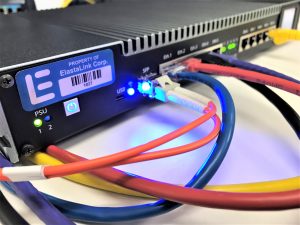
A good decision is to install a new router; many, like the one ElastaLink uses, have Wi-Fi built in. The early installation will ensure you have the best new technology and software and it is all properly configured. You can even use the same passwords as at the old location. If you believe all technology can be installed and tested on moving day you run a real risk of serious problems. The cost of buying new equipment and early installation will be much less than the cost of lost business and employees who are unable to do their work.

As for Wi-Fi coverage, if you install and test the equipment ahead of time you may well find that Wi-Fi will not work flawlessly when you turn it on. There may be too many walls, interference from surrounding networks, and you may find you need to add more access points to ensure full signal coverage.

Mikrotik Training

It Is Moving Day

Just before the move, make a complete backup of your old system and all data. This data should be stored at an off-site facility. Check that it is, in fact, a good backup. If some key equipment electronically crashes or is physically dropped and you lose key corporate data, the backup will save your firm. Read our blog on the value of backups and disaster planning.

And now it is here, Moving Day. If you do not have your own IT staff then consider booking skilled IT help to properly disconnect and reconnect equipment. Putting a wire in a wrong port can create a rash of problems. Also, there is a proper way to transport equipment such as servers to reduce the risk that vibrations may break connections on equipment that may not have been moved for years. Consider keeping the IT help for the day after the move or maybe two days in order to fix unexpected problems. This will ease employee concerns and make sure fixes are done in a professional and lasting fashion.

Finally, sit back and relax a bit, take your planning committee out for a nice dinner and say “thank you” for their efforts. Then it’s back to work with smoothly operating Office IT.

Click here to download our Moving Tech Checklist. You can print it off and keep it as a reminder of what needs to be done. If you wish to automatically receive future blog posts please send us a note.

Tech training ensures IT truly helps your business

The key role that Information Technology plays in any business today demands that staff be properly trained on new or upgraded systems. ElastaLink is a firm believer in training and has partnered to provide top-level training on a range of services and devices including our leading enterprise-grade routers. We also offer Level 2 & 3 support.

Yes, training costs money and time but NOT providing training can take a serious toll on a business. The new reality is that every employee must constantly be learning if they hope to stay current. Every business should maximize its internal technical staff by keeping them up to date on changes in technology and a firm will save money if it doesn’t need to outsource in order to gain the required technical knowledge.

TOP 10 REASONS TO PROVIDE TECH TRAINING

  1. Staff who can’t properly use a system will be less efficient, less motivated and may well leave the firm. That forces an expensive investment of time and money to recruit hard-to-find new employees.
  2. Training reduces confusion and mistakes with the new equipment.
  3. Trained employees can teach other staff using an in-house training program.
  4. Training ensures that staff are able to take full advantage of new features and keeps them on top of rapidly changing technologies.
  5. Training reduces unnecessary work for IT staff, since employees can solve minor problems themselves.
  6. Training makes staff feel valued and empowered.
  7. Job satisfaction levels rise with training.
  8. A better-trained staff helps the company remain competitive.
  9. Increased capability to handle new tasks and processes that can make the company more profitable.
  10. Getting the most out of technology means the company gets the most out of its original investment.

A TRAINING COURSE CASE STUDY

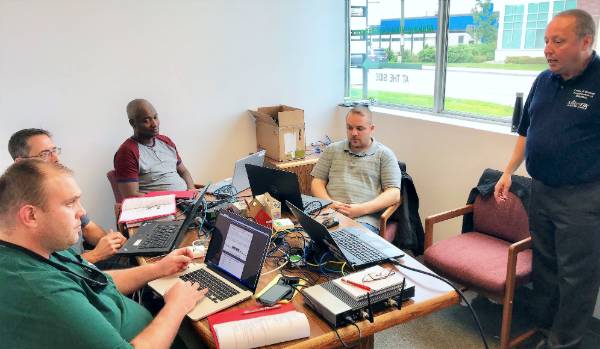
A good example of the value of tech training is a course on networking equipment that is used in any office. That is, the router, switches and access points, equipment that connects your employees to the Internet and thereby your customers. ElastaLink has partnered with Telecommunications Alain Casault of Montreal to offer router courses both in Montreal and Ottawa. Casault, seen in the photo, is standing in front of a class of students. He is a Certified MikroTik Network Associate, a routing engineer, a wireless engineer, and a certified trainer. His training extends into areas such as firewalls, TCP/IP and networking. He is also a telecommunications consultant.

Mikrotik Training

At a recent course at the Ottawa offices of ElastaLink, students included Rob Butler from ElastaLink, two technicians, Mario Leblond and Yvelino Chery, who both work for a municipal government and Matthew Hunt who came from Bellingham in Washington state where he works for Lummi Nation College. They all use the MikroTik or MacroTick routers every day.

The reasons they want to take a training course are very common. Butler says you may know what you want to do but the routers are powerful and complex and the course gives you new ways to make them perform. Chery says he wanted to take the course to expand his knowledge while Hunt says the router is well designed and makes sense but it’s good to get a detailed course on how things are done. Leblond says he is new to the router and his priority was to learn troubleshooting techniques and expand his overall knowledge.

Casault says more than four years as a tech teacher has convinced him of the clear benefits of any level of tech training. He says it makes “a huge difference and helps people break through the wall that blocks their progress.” He adds tech training is “crucial if people want to advance their careers”. For the employer, Casault says training produces more knowledgeable staff who can deliver projects faster and in-house training helps new staff get up to speed faster.

CHANGES IN HOW TO TRAIN EMPLOYEES

Be aware that training techniques are changing. Influenced by millennial workers, with their social media skills and quick, right-now learning methods, many large firms such as Amazon and Google are moving away from classroom-style teaching to online and just-in-time learning. A manager can teach something new exactly when the worker needs to learn the new skill. After the job is done, the manager can offer a critique.

Virtual or online classes allow an employee to learn at their own pace, when and where they want on whatever device they choose. Blended learning can involve a variety of learning techniques and ubiquitous learning is available anytime and includes daily tasks. An employer needs to determine an employee’s skill level and then choose the style of learning that will be most effective and cost-effective for the firm.

ELASTALINK TRAINING ADVICE

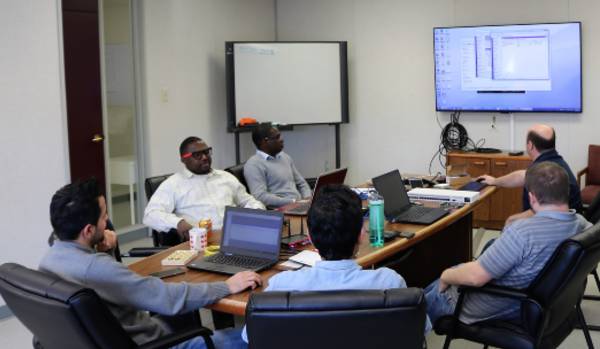
ElastaLink offers many training options for our clients aimed at IT staff and IT administrators. And yes, we do train our own staff. Here, Dan Lajeunesse works with ElastaLink staff, including some new hires, on the many facets of the MacroTick router.

Mikrotik Training

Our focus is always on practical knowledge that solves the kind of day-to-day issues faced in business. Many other training programs have a very narrow focus on a particular device or application while ElastaLink finds that our clients often want a broader approach that teaches practical skills and expands their knowledge base so that they can be more effective at tackling a range of devices and systems.

If your company is considering a major training program please contact ElastaLink or send us a message. We would be pleased to provide you with information on government programs that may well provide you with some funding assistance, depending on exactly what training you plan to do and who will receive that training.