Why Is Your Internet Connection So Slow?

When you signed the deal for an Internet connection at the office you likely decided to go for the fastest speed possible. In our fast-paced and connected world, no one wants to wait for the Internet. For example, the average time someone will wait for a website to load is just three seconds.

Does your Internet link measure up? Is your connection slow or perhaps the problem is with the design of your website? ElastaLink offers an easy four-step guide to help you check out your Internet speed.

1. Test your speed.

The easiest way to test Internet speed is using an online speed test tool like the speed test offered for free by ElastaLink. It measures your bandwidth and connection quality by sending as much test data as possible between your browser and test servers. Based on your location, our tool will select two test servers that are closest to you. Testing with servers that are far away on the internet will give you a false result. When doing a test, keep in mind that other users are also using the Internet at the same time, and when you send maximum data during the test, it might affect other users.

We provide four key numbers: download and upload speeds in megabits per second (Mbps), plus your ping and jitter in milliseconds (ms). Download and Upload measure the speed at which data moves from your computer to the Internet (Upload) and from the Internet to your computer (Download). Ping and Jitter are measures of your connection when you request and receive data (Ping) and the variation in that response time (Jitter).

Try the test at different times of the day to see how your speeds fluctuate. Here are some figures for comparison to your speeds: As of November 2017, the Speedtest.net Global Index reports that for the average Canadian fixed broadband, Upload speed was 39 Mbps and download speed was 91 Mbps which is a big increase from previous years due to faster connections such as fibre being more affordable.

An industry average states that a ping rate below 60 ms and jitter below 10 ms means you have a good connection. How does your connection measure up? Go to the ElastaLink speed test and find out.

2. Check the agreement with your Internet Provider.

When you have the speed test results, check exactly what your Internet agreement promises in terms of speed. Is your Internet Service Provider (ISP) delivering what you’re paying for?
Before you call your ISP to ask for an explanation you also need to determine what connection you are using. Different connections deliver very different speeds:

DSL, or Digital Subscriber Line, delivers Internet data over copper lines that were originally built for phone service. Legacy DSL connections can handle at maximum around 6 Mbps. However, by using new technology, variations of DSL have been developed including FDSL, FTTN, FTTH, Bonded DSL, etc. that can now deliver up to 100 Mbps download speeds with a dedicated connection.

Cable delivers Internet over coaxial lines that were built to deliver TV signals, and provides a wider highway than DSL and currently has a maximum of around 200 Mbps. But this number can be misleading because cable infrastructure is shared between multiple users, unlike DSL that is a dedicated connection used only by you. So, unless you are the only one in the neighbourhood you might never receive the advertised speed from your cable provider. Unpredictable speed and connection quality are the main reasons why ElastaLink does not recommend cable connections for business unless there are no other alternatives.

Fibre optic cable is fastest, topping out at a whopping 10 Gbps, but most equipment can’t deliver those speeds as yet. Typical customer connections are either 100 Mbps, 500 Mbps or 1 Gbps. In most cases, upload speed is the same or close to the download speed and connection quality is the highest. For a long time, fibre connections were too expensive for many to consider, but prices have been dropping in recent years.

LTE refers to cellular networks that deliver the Internet to your mobile smartphone but the signal can also be used to deliver the Internet to your business. Right now LTE operates on a 4G network and in the coming years will move to faster 5G networks. The biggest drawback can be the high cost of data plans.

Fixed wireless refers to a situation where a provider distributes data via a wireless signal from a central location to receivers that feed customers’ computers. The most common use of this connection is in rural areas where it is the most effective connection and sometimes the only one available. However, the signal is susceptible to weather interference and interference from other signal sources. Even a growing tree can block the signal.

3. Determine the speed you need

You can overload your Internet connection and cause it to slow down. You need to consider how many users you have online at the same time and what they will be doing. Modem manufacturer Netgear sets out some guidelines for speed vs uses.

  • 5 Mbps or less: Basic web surfing and email
  • 5-10 Mbps: Web surfing, email, occasional streaming with only a few users and devices
  • 10-25 Mbps: Moderate HD streaming, email, Web searching, with a moderate number of connected devices
  • 25-40 Mbps: Heavy streaming and Web use with a large number of devices.
  • 40+Mbps: All of the above with a very large number of users and devices

Remember to add up all of the activities that are happening at the same time to arrive at your actual needs. Based on our experience, business customers are often using less than half of what they think they need so they are very likely paying too much. This is different from your home Internet needs, especially if you are watching Netflix while the kids are playing video games on Xbox.

4. Review your equipment infrastructure

Once you’ve determined how much Internet speed you will need you then need to review the equipment you have to determine if it can, in fact, handle the speed being delivered. That means your modem and/or router might need to be upgraded, or its settings may be incorrect so the device is not able to handle the maximum flow of data. You can try a simple reboot (turn the device off and on) to see if that improves performance. Devices all have limits to the amount of data they can process and older routers might not have enough resources (memory, processor) to handle the higher speed.

If you are using Wi-Fi to distribute the Internet connection, is it able to handle the speed and use demands or is there some interference with the signal? If you have a router with built-in Wi-Fi, based on location it might not be able to provide consistent coverage and speed within your premises, and you should consider adding a dedicated Wi-Fi access point that is located close to your Wi-Fi devices.

If you need to upgrade your Wi-Fi consider a dual-band wireless access point that provides you with essentially two different networks: one at 2.4 GHz (the same speed as most single-band routers), and a faster 5 GHz network that’s optimized for streaming media-rich content.
Router
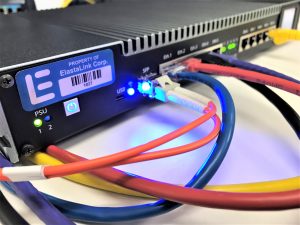
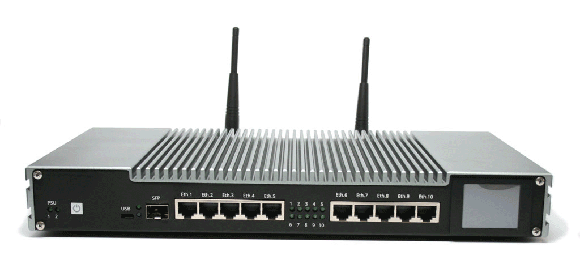
A dual-band router with a superior range definitely improves the streaming experience of any device on your network. ElastaLink uses the industry-leading MacroTick router with advanced features such as seamless failover, built-in UPS (battery) and advanced security.
Next on the equipment checklist, examine devices such as computers, laptops and tablets. It is possible they are outdated and cannot process the data fast enough and need new processors or you may have to buy new computers.

If the slowdown seems limited to one computer it is possible that computer is infected with malware that causes a slowdown in processing speeds, or there is an anti-virus program or firewall that is causing a bottleneck. In addition, you may be running too many software programs and Web links for your computer to handle it all.

These kinds of checks can be done by ElastaLink’s professionals as part of our free, two-hour, no-obligation assessment of your current setup. Read our blog on the value of an assessment and then book an appointment.

FINAL THOUGHTS

As you can see, there are many reasons your Internet connection may be slow. Even if the speed was good when it was first installed, growing demands and ageing equipment can change the equation. The data you download and upload goes through many devices and may travel through several connections and servers so you need to take an organized approach to see which parts of this complex system may need to be upgraded. Certainly, a good starting point is to run a speed test and ElastaLink provides a free checkup. Here is the link to the speed test.

How to prevent a data disaster from destroying your firm

In September of 2018, six tornadoes swept across the Ottawa-Gatineau region destroying or damaging hundreds of homes, power lines and businesses. It was an exceedingly rare event but it served to focus our attention on the impact of a disaster no matter what form it takes. For companies, disasters are a real threat to survival.

At ElastaLink disaster protection (DP) is a cornerstone of our planning. After the tornadoes, one of our two data centres lost power but the backup generator did its job and the centre operated without any loss to our core network and that meant no loss of services for our clients.


Several studies by agencies such as the American Federal Emergency Management Agency, Price Waterhouse Coopers, Touche Ross and the Institute for Business and Home Safety suggest that anywhere from 25% to 90% of small firms that suffer a major data loss from a disaster go out of business either immediately or within a couple of years. Whatever the exact number may be there is no doubt that property destruction coupled with data destruction is a deadly one-two punch and the attacks can arrive in many ways.

How disaster can strike your company

(ranked by likely threat level)

  1. Hardware failure
  2. Human error causes 50-60% of major data losses
  3. Unexpected software patches or updates
  4. Power outage
  5. Fire
  6. Hacker attack
  7. Ransomware
  8. Flood
  9. Earthquake
  10. Hurricane

No matter what crashed your system there is a cost. Gartner, the consulting firm, says the average per minute loss due to downtime is nearly $6,000. Clearly, the size of your firm will dictate how far above or below that average you may be.

img-bg-phone

So how do you reduce the risk? In recent years risk assessment and associated planning to mitigate your risk and make your firm more resilient and therefore able to recover faster have become a science. Topping your thoughts as you think about planning for disaster should be the words redundancy and data centres. Redundancy in everything from power supplies to Internet connections to backups. Remember that your company is much more likely to survive if your data survives. Buildings, computers, phones and other physical resources can be replaced but data, a company’s lifeblood, can only be restored if it has been protected. It is estimated that 30% of firms don’t have a disaster recovery plan and of those that do, nearly half of the plans did not work properly.

img-bg-phone

Disaster planning to reduce the risk

Develop a disaster recovery plan. Strike a committee to look at the company and determine a priority list of your business functions and what needs to be protected. How will it be protected and how will it be restored? Set clear goals on what you want to accomplish. For example, do you need two ways to get Internet service? ElastaLink offers a secure primary path plus a way to use LTE cell phone service as a backup to get Internet.

Tell your employees about the plan and practice it. Make sure it works before a disaster takes place.

Automated backups, ideally every day, of all your data and especially your email data. Backups should meet all compliance regulations that might cover your industry. This data should be stored off-site in a data centre which has its own disaster protection plan. This is what ElastaLink offers and we use two data centres that are in different cities.

Analyze what you have. What are your current capabilities and what do you need to add to accomplish your goals? ElastaLink offers a free two-hour assessment of your IT situation and can create a disaster recovery plan customized for your firm.

Create action plans. For each kind of disaster, there should be a written plan of action so everyone knows what needs to be done and the priority jobs that must be done to get you back in business.

At the beginning of this article, we noted the success of our data centre in a seamless disaster recovery. For those who still don’t believe in data centres as being key to both daily operations and disaster recovery, in February of 2018 a Cisco report stated that annual IP traffic to data centres will nearly triple within three years. Cisco experts noted:

“Data centres are at the crux of delivering IT services and providing storage and communications… they touch nearly every aspect of an enterprise. The efficient and effective use of data centre technology … adds to the agility, success, and competitive differentiation of a business.”

A 2017 Gartner report says data centres serve as the “glue” for advanced business applications. Among the study’s conclusions:

  • It is unlikely that businesses will be able to handle increasingly rich digital applications using only a traditional on-premises server facility
  • The ability provided by a data centre to integrate multiple applications and data types in a secure system will spell the difference between business success and failure.

Free Assessment of your Office IT

In a connected world where there are nearly four billion Internet users and business is driven by the Internet, the proper technology in your office and mobile technology on the road is crucial to business success. If the technology isn’t working the way you want then why not have a second set of eyes look at your system?

ElastaLink of Ottawa provides a FREE, no obligation, two-hour assessment of your current situation. You may feel that the on-going provision of IT services for employees consumes too much time and money, creates aggravation and costs you lost business opportunities. Or you may be setting up a new office. Either way, our IT and communications experts will take stock of the situation, discuss your challenges and what you want IT to do.


Here are some of the items we examine when we come to your office.
  • We ask about your company – what you do, what role technology plays and what is not working. This allows us to evaluate if existing technology and services are right for your business.
  • Are you getting the most out of your current system? Perhaps your equipment cannot handle the full Internet speeds from your provider, or maybe that provider is not delivering what was promised. Our analysis will be able to show you how to save money on your IT budget.
  • What equipment do you have now and how can it be integrated into our solution? We don’t expect you to throw out what you have and start all over.
  • Is your system secure, are there open ports or other obvious security risks, have you upgraded your software and security measures to block hackers?
  • If you are using Wi-Fi networks we can quickly test for coverage, signal strength, determine whether your network is secure and whether it overlaps with other Wi-Fi networks.
  • We look at your computers, what software and applications are being used, are the computers in need of an update? If you have old software it may no longer be supported and that increases security risks and the possibility of a crash and lost data. It is estimated that 40-60% of firms that lose their data are out of business within six months. 1 in 3 firms has no disaster recovery plan.
  • New technology is coming out all the time and we may be aware of a new solution for your problems and at a lower cost.

Your system seems to be doing its job, so your view is, if it’s not broken, what’s there to fix? Well, there are things that could go wrong and our experience in managing and monitoring enterprise networks and systems can pinpoint areas that are in need of some attention before they break down.

After the assessment, ElastaLink’s staff design a customized plan of action that highlights both your strong and weak areas. There is no obligation but our experience shows that we can reduce most IT budgets by at least 20%.

Take a moment to consider your company’s performance in the past year. Perhaps you added staff, changed production processes, expanded your client count, put more people on the road who still need to be in touch. Have you considered how these things can change what you need in the way of communications and IT equipment?

ElastaLink can be your IT partner going forward or we can give you our free, no-obligation, unbiased assessment and you decide the next step.

Technology can and should help you do business, not hinder success. Book your free assessment and plan of action today.